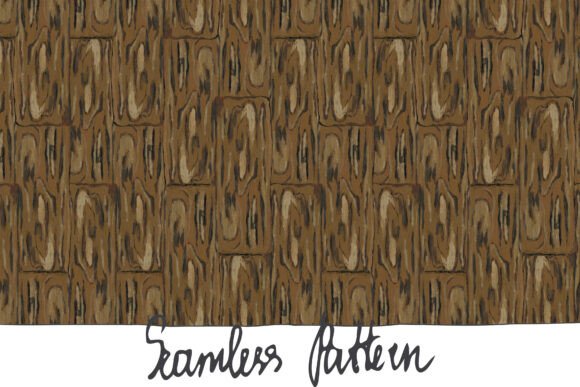
Mastering the Wooden Floor Seamless Pattern for Professional Designs
There is a distinct warmth and timeless appeal that only wood textures can bring to a design project. Whether you are creating a cozy interior mockup, designing packaging for an organic product, or building a rustic-themed website, the right texture sets the entire mood. However, finding a Wooden Floor Seamless Pattern that looks authentic rather than repetitive or artificial can be surprisingly challenging. Many creators rush into downloading the first image they find, only to discover later that it ruins their composition or fails to print correctly. Understanding the nuances of high-quality textures, specifically hand-painted options, is crucial for avoiding these pitfalls and elevating your final output.
A true seamless pattern is more than just an image of wood; it is a tileable asset designed to repeat infinitely without visible edges or breaks. When you work with a hand-painted wooden floor pattern, you gain an artistic advantage that photography often cannot match. Acrylic paints introduce subtle variations in grain, color depth, and brushstroke texture that mimic the imperfections of real wood while maintaining a stylized consistency. This specific type of asset, often delivered as a high-resolution JPG within a ZIP file, offers a unique blend of organic feel and digital utility. Yet, even with such a valuable resource at your fingertips, common misunderstandings about resolution, color space, and application can lead to frustrating results.
The Trap of Low Resolution and Print Failure
One of the most frequent errors designers make, especially those new to texturing, is overlooking the relationship between pixel dimensions and physical print size. You might find a beautiful wooden floor image online, but if it is optimized only for web use, it will likely fail when you attempt to use it in physical media. A standard screen resolution of 72 DPI (dots per inch) is insufficient for professional printing. If you try to print a low-resolution image at 12x12 inches, the result will be pixelated, blurry, and unprofessional.
To avoid this, always verify the technical specifications before downloading or purchasing. A robust asset should provide a resolution of at least 300 DPI. For a 12x12 inch format, this translates to a file size of approximately 3600x3600 pixels. This density ensures that every brushstroke from the acrylic painting process remains crisp, whether viewed on a retina display or printed on high-quality cardstock. When your file meets these standards, you retain the flexibility to scale the pattern down for small icons or use it at full size for large posters without losing fidelity. Ignoring this metric often forces a redesign late in the project, costing both time and money.
Misunderstanding Color Spaces: sRGB vs. CMYK
Color management is another area where well-intentioned projects often go astray. Digital files typically operate in the sRGB color space, which is optimized for screens, monitors, and mobile devices. However, many beginners assume that what they see on their monitor will look exactly the same when printed by a commercial press. While sRGB is the standard for the JPG format included in most digital downloads, printing presses generally require CMYK. If you send an sRGB file directly to a printer without conversion or proofing, the rich browns and warm tones of your wooden floor pattern may appear dull, muddy, or shifted toward green.
The solution is not to avoid sRGB files, as they are the industry standard for digital distribution and web use. Instead, understand your end goal. If your project is strictly digital—such as a website background, social media graphic, or video game texture—the provided sRGB profile is perfect and requires no adjustment. If you intend to print, perform a soft proof in your design software to simulate how the colors will translate. High-quality hand-painted textures usually have enough color depth to withstand this conversion gracefully, but being aware of the potential shift allows you to make minor corrections before hitting "print."
The Repetition Problem and Scale Awareness
Even with a technically perfect "seamless" file, a common aesthetic mistake is ignoring the scale of the pattern relative to the canvas. A seamless pattern works by tiling, but if the wood planks are too large or too small for your specific layout, the illusion of reality breaks. For instance, using a close-up wooden floor texture on a large website background might make the room look like a giant's house, breaking the user's immersion. Conversely, a texture that is too fine might look like noise from a distance.
When utilizing a 3600x3600 px asset, take advantage of the high resolution to test different scales. Most design software allows you to define the pattern and then adjust its scale independently of the image size. Before finalizing your design, step back and view the composition at 100% zoom. Does the grain direction make sense? Do the knots and acrylic brush marks feel natural in the context of the object you are texturing? Hand-painted patterns often have a directional flow; ensure this flow aligns with the perspective of your scene. Misaligned grain is a subtle detail that subconsciously signals "fake" to the viewer, reducing the overall quality of the work.
Maximizing the Value of Hand-Painted Textures
Why choose a hand-painted acrylic pattern over a photograph? The answer lies in control and style. Photographs capture everything, including unwanted reflections, dust, and inconsistent lighting. A hand-painted Wooden Floor Seamless Pattern offers a curated reality. The artist has already balanced the lighting and emphasized the most characterful parts of the wood grain. This makes the texture incredibly versatile for branding and illustration where a specific mood is required.
However, users often underutilize these assets by applying them flatly without blending modes. To integrate the texture naturally into a design, experiment with layer blending modes like Multiply, Overlay, or Soft Light. This allows the underlying colors of your design to interact with the wood texture, creating depth rather than just pasting an image on top. Additionally, because the source is a single high-resolution JPG within a ZIP file, you have the freedom to crop specific sections of the pattern to create unique non-repeating elements, such as a featured hero image or a custom icon background, adding further value to the single download.
Checklist Before You Begin
To ensure your project succeeds from the start, run through this quick verification process when evaluating your texture files:
- Verify Dimensions: Confirm the image is 3600x3600 pixels or larger to guarantee 300 DPI at 12 inches.
- Check Seamlessness: Tile the image horizontally and vertically in your software to ensure no hard lines interrupt the flow.
- Assess Color Profile: Ensure the file is tagged with sRGB for digital consistency.
- Evaluate Artistic Style: Determine if the hand-painted acrylic style matches the tone of your brand or project.
- Test Blending: Apply the texture with different opacity levels and blending modes to see how it interacts with your foreground elements.
By paying attention to these details, you transform a simple image file into a powerful design tool. The difference between an amateur-looking project and a polished, professional piece often comes down to these technical foundations. Embrace the richness of hand-painted textures, respect the technical requirements of resolution and color, and your designs will resonate with warmth and authenticity. Whether you are a freelancer pitching to a new client or a hobbyist creating personal art, mastering these elements ensures your wooden floor patterns do exactly what they are meant to do: ground your design in reality.